

Email list hygiene checklist: the checks to run before a big send
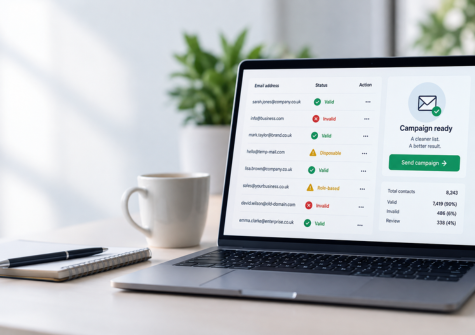
Email list hygiene is the process of regularly checking and cleaning the email addresses in your database. It helps remove invalid, outdated or unwanted addresses before they cause problems with bounces, deliverability and campaign performance.
For marketing teams, email hygiene is really a deliverability job. Done properly, it happens before send day, so problems get fixed in your data rather than discovered in your bounce report.
That matters most before a large campaign such as Black Friday or Christmas, when you may be sending to thousands of contacts at once. This guide covers what to remove, the symptoms that tell you a list needs attention, and a 24-hour checklist to run before you press send.
What is email list hygiene?
Email list hygiene means keeping the email data in your CRM or marketing platform accurate, usable and up to date.
Over time, even a well-built email list can deteriorate. People change jobs, businesses close, domains expire and inboxes get abandoned. Users can also enter an address incorrectly when completing a form.
As a result, the list you collected a year ago may not be the same list you should send to today.
Good email list hygiene can include:
-
checking email address formatting;
-
identifying invalid or unreachable addresses;
-
checking whether domains can receive email;
-
identifying disposable email addresses;
-
reviewing role-based addresses;
-
removing known hard bounces;
-
maintaining suppression lists; and
-
making sure unsubscribed contacts are not added back into marketing campaigns.
Importantly, list hygiene is not about deleting contacts simply because they have not opened an email recently. Engagement and email validity are different things.
Instead, the aim is to understand the quality of the data before you use it.
Why email list hygiene matters before a high-volume send
A large email campaign magnifies problems in your data.
Imagine sending a small campaign to 500 contacts. If 20 addresses are no longer valid, the impact may appear relatively limited.
Now imagine sending your Black Friday campaign to a database of 100,000 contacts that has not been checked for a year. Small data-quality problems can suddenly become thousands of failed delivery attempts.
This is why email validation before a send is particularly useful for older or infrequently used databases.
Bounces can affect sender reputation
A hard bounce happens when an email cannot be permanently delivered. For example, the mailbox may no longer exist or the domain may be invalid.
A high number of failed deliveries can be a negative signal to email providers. Consequently, repeatedly sending to addresses that cannot receive your messages may harm your sender reputation and make it harder for future campaigns to reach the inbox.
Validation lets you identify many of these problems before the campaign begins.
If you want to understand the process in more detail, read our guide on how to check if an email address is valid without sending an email.
Deliverability and validation are not the same thing
It is worth making an important distinction.
Email validation asks whether an email address appears technically capable of receiving email. Email deliverability asks whether the message you send actually reaches the recipient's inbox.
Validation can therefore improve the quality of the data going into a campaign, but it cannot guarantee inbox placement.
Your sender reputation, authentication, email content, sending patterns and recipient engagement can all affect deliverability too.
The Black Friday problem
Black Friday is exactly when many businesses rediscover old customer and prospect databases.
A list that receives regular campaigns may already have processes in place for dealing with hard bounces and unsubscribes. In contrast, a database that has been sitting unused for months can contain addresses that have changed since the last campaign.
At the same time, sending volumes often increase sharply around major retail events.
That makes the days immediately before a large campaign a poor time to discover that part of your database is no longer usable.
Cleaning and validating the data beforehand gives your marketing team time to review the results rather than reacting after the send.
What goes wrong with an unclean email list?
Poor email list hygiene can create several different problems.
Hard bounces
Some email addresses simply no longer work.
An employee may have left a company, an old mailbox may have been deleted or a domain may no longer exist. Continuing to send to these addresses creates unnecessary bounces.
Typos and formatting errors
Some bad addresses were never valid in the first place.
A misplaced character, missing @ symbol or incorrectly entered domain can turn a genuine lead into an undeliverable address.
Basic formatting checks can identify obvious problems before they reach your email platform.
Disposable email addresses
Disposable or temporary email services allow someone to create an address that may only exist for a short period.
These addresses can be useful to the person entering them, but less useful to a business trying to maintain a reliable long-term customer database.
Identifying them allows you to decide how they should be handled.
Role-based addresses
Addresses such as sales@, info@ or support@ are linked to a role rather than one individual.
That does not automatically make them invalid or unsuitable. However, they may need different treatment depending on why the address was collected and how you intend to use it.
Unsubscribed contacts
An email address can be completely valid and still be someone you should not market to.
That distinction is essential.
The ICO advises organisations to keep a “do not contact” or suppression list for people who opt out and to screen marketing lists against it. In other words, validating an address does not give you permission to send marketing to it.
You still need to comply with the rules that apply to your campaign, including the Privacy and Electronic Communications Regulations (PECR) and, where personal information is involved, UK data protection law.
Five bounce and deliverability symptoms to watch
Most email deliverability issues show up in your campaign reports before a list fails outright. If you spot any of these in recent sends, treat your next big campaign as a warning rather than a routine job.
| Symptom | What it usually means | What to check before you send |
|---|---|---|
| Hard bounce rate creeping up | Mailboxes that no longer exist, or addresses mistyped at sign-up | Validate the full send list and suppress every address that comes back invalid |
| Soft bounces repeating for the same contacts | Full or abandoned inboxes, or a receiving server that keeps refusing mail | Review contacts that have soft bounced across several sends and decide whether to pause them |
| Open and click rates falling across the board | More of your mail landing in spam folders, not just less interest | Look at bounces and complaints alongside engagement, and check your domain authentication |
| Spam complaints rising | Contacts who do not remember you, or old records being mailed for the first time in years | Check when these contacts last engaged and whether old data has slipped into the segment |
| Lots of disposable or role-based sign-ups | Form abuse, freebie hunters or shared inboxes that nobody owns | Flag disposable and role addresses and decide whether they belong in a marketing send |
One symptom on its own is not a crisis. Two or three together usually mean list quality is starting to drag down email deliverability for your whole send, including the contacts who do want to hear from you.
What to remove before you press send
Cleaning a list does not mean deleting everyone who has gone quiet. It means taking out the records most likely to bounce, duplicate or damage your sender reputation. Before a big send, deal with these four groups.
Invalid addresses
These are addresses with broken formatting, domains that do not exist or mailboxes that reject mail. They are the main cause of hard bounces and there is nothing to gain by sending to them. Suppress them, and only correct them where you have a reliable source for the right address.
Role accounts
Addresses such as info@, sales@ or admin@ usually belong to a team rather than a person. Some are worth keeping, but they tend to engage less and attract more complaints. Flag them and decide case by case instead of sending by default.
Duplicates
The same person listed twice, often with different capitalisation or a stray space, gets two copies of your email. That looks careless and doubles the chance of a complaint. Convert addresses to lower case, trim spaces and de-duplicate before you build the final send list.
Stale records
Contacts with no opens or clicks for a long time, especially those added years ago, deserve a closer look. Some abandoned inboxes are eventually recycled as spam traps, which mailbox providers use to spot senders with poor list hygiene. Validate these records first and consider a smaller re-engagement email rather than including them in your main campaign.
Finally, re-apply your suppression list. Anyone who has unsubscribed must stay out of your sends (see the ICO's guidance on electronic mail marketing), and previous hard bounces should stay out too.
How to clean an email list before a campaign
So, what should you actually do before a big send?
Here is a practical email list hygiene process.
1. Start with the data you plan to use
First, define the audience for the campaign.
Avoid exporting your entire CRM simply because the data exists. Work from the contacts who genuinely fall within the intended campaign audience.
This makes the cleaning process easier and gives you a clearer picture of the data you are actually going to use.
2. Check the email format
Next, identify obvious formatting problems.
A basic syntax check can flag addresses with missing characters, invalid structures and other errors that would prevent successful delivery.
However, correct formatting alone does not prove that an email address works.
[email protected] might look perfectly valid while the mailbox itself no longer exists.
3. Check the domain and mailbox
The next stage is email validation.
A validation service can perform technical checks to assess whether the domain exists, whether it is configured to receive mail and whether the individual mailbox appears reachable.
Crucially, this can be done without sending a test email to the contact.
That gives you more information about your list before you put your sender reputation behind a full campaign.
4. Identify disposable and role-based addresses
Depending on your campaign, it may also be useful to identify disposable and role-based email addresses.
Do not automatically assume that every flagged address should be deleted. Instead, use the information to make a decision based on your business, the source of the data and the purpose of the campaign.
5. Apply your suppression list
Before sending marketing emails, compare the final campaign list against your suppression records.
Anyone who has opted out should remain suppressed even if their email address passes every technical validation check.
This is one of the most important distinctions in email list hygiene: an address can be technically valid without being appropriate to contact.
6. Deal with the results
Finally, decide how each result should be handled.
Valid addresses may be ready for the next stage of your campaign process. Invalid addresses can be removed or corrected where you have reliable updated information. Uncertain results may need further review.
Avoid simply replacing questionable data with guessed information. The purpose of cleaning is to improve accuracy, not create a different kind of inaccurate record.
For a wider database-cleaning process covering more than email, see our guide on how to clean and validate a UK customer database for GDPR.
The 24-hour email list hygiene checklist
Most of the work above should happen well ahead of a campaign. The day before send day, run this short checklist on the final list you plan to use.
- Export the exact segment you are sending to, not the whole database.
- Validate every address and remove anything marked invalid or undeliverable.
- Flag disposable addresses and role accounts, and make a decision on each group.
- Convert addresses to lower case, trim spaces and remove duplicates.
- Re-apply your unsubscribe and hard bounce suppression lists.
- Compare the final list size with your last similar send. A big unexplained jump usually means old data has crept in.
- Send a test to a few internal inboxes on different providers and check it lands in the main inbox.
- Keep a record of your validation results so you can compare bounce rates after the campaign.
If any step throws up a surprise, such as a large batch of invalid addresses from one source, pause and investigate before you launch.
When a quick cleanse is not enough
Validation removes bad addresses. It cannot fix every deliverability problem, so it helps to know where its limits are.
If bounces stay high after cleaning, look at where the data is coming from. A sign-up form with no basic checks, or an old imported list, will keep refilling your database with poor addresses. Fix the source as well as the list.
If engagement keeps falling on a clean list, look at your sending reputation. Make sure your domain authentication is set up correctly: SPF, DKIM and DMARC are the DNS records that prove your emails really come from you. The National Cyber Security Centre's email security guidance explains what each one does.
And if your list has not been checked for a year or more, treat the first cleanse as a reset rather than a quick tidy. Expect more invalid and risky results than usual, and leave time to review them before your campaign deadline.
How often should you clean your email list?
There is no single cleaning schedule that works for every organisation.
A better rule is to clean data based on how quickly it changes and how you use it.
For example, a company sending frequent campaigns may want validation built into its normal data processes. A business with a database that is only used for occasional campaigns may prioritise validation shortly before each major send.
There are several useful points to consider cleaning or validating email data:
-
when an address first enters your database;
-
before importing an older list into a new platform;
-
before a high-volume campaign;
-
after a long period without contacting a list; and
-
as part of regular CRM maintenance.
Ideally, email list hygiene should be an ongoing process rather than an emergency job the day before a campaign.
Checking data at the point of capture can stop some poor-quality information entering your CRM in the first place. Regular checks can then help identify records that have become outdated later.
Email hygiene vs GDPR: is a stale list a compliance risk?
Email list hygiene and GDPR compliance are related, but they are not the same thing.
Under the UK GDPR's accuracy principle, organisations must take reasonable steps to ensure personal data is accurate and, where necessary, kept up to date.
Therefore, if email addresses form part of the personal data you hold, data accuracy should be part of your wider data-management process.
However, validating an email address does not make a marketing campaign GDPR or PECR compliant.
You must separately consider whether you are allowed to use the data for marketing and whether the appropriate consent or other requirements are met.
For electronic marketing, the ICO explains that PECR sets specific rules for marketing by email. For example, unsolicited marketing emails to individual subscribers generally require consent unless the requirements of the soft opt-in apply. Different rules can apply to corporate subscribers.
The ICO also makes clear that organisations should maintain suppression records so that people who have opted out are not accidentally contacted again.
In short:
Email validation tells you whether an address is usable. It does not tell you whether you have permission to use it for marketing.
For more detail, see the ICO's guidance on electronic mail marketing.
Frequently asked questions about email list hygiene
What does email list hygiene mean?
Email list hygiene is the process of checking and maintaining the quality of the email addresses in a database. It can include identifying invalid addresses, outdated mailboxes, disposable addresses, previous hard bounces and contacts who must remain suppressed from marketing.
Does cleaning an email list improve deliverability?
It can help.
Removing invalid and undeliverable addresses can reduce avoidable bounces and improve the quality of the data used for a campaign. However, email deliverability also depends on other factors, including sender reputation, authentication, sending behaviour, content and engagement.
Therefore, email validation should form part of a wider deliverability strategy rather than being treated as a guarantee of inbox placement.
How can I reduce my email bounce rate before a campaign?
Validate your email data before sending, particularly if the database is old or has not been used recently. Check formatting, domain validity and mailbox reachability, then remove known invalid addresses from the campaign.
You should also make sure previous hard bounces and unsubscribed contacts are correctly suppressed.
Should I delete every email address that fails validation?
Not necessarily.
The appropriate action depends on the validation result and why the data is held. Some results may be uncertain rather than definitively invalid.
Review the result and your reason for holding the data before deciding whether to correct, suppress, retain or remove a record.
Can I send marketing emails to an address if it passes validation?
Not automatically.
Validation assesses the technical quality of an email address. It does not provide consent or establish that you are otherwise permitted to send marketing emails.
You must still comply with PECR and applicable UK data protection requirements.
When should I validate my email list before Black Friday?
Do it early enough to review and act on the results before your campaign is due to launch.
Leaving validation until immediately before the send gives your team little time to investigate questionable records or fix problems with the underlying CRM data.
For a major campaign, make list quality part of the preparation rather than the final pre-send check.
Clean your email list before your next big send
A major campaign should not be the first test of whether the email addresses in your database still work.
Regular email list hygiene helps you find invalid and outdated data before it turns into bounces. It can also give your team a clearer understanding of the database they are about to use.
Data Soap's email verification service checks every address for formatting, mailbox existence, disposable and role-based addresses and catch-all domains, then gives you a clear safe-to-send result. Upload a file through the drag-and-drop portal, no IT team required, and download a cleaned list ready for send day.
Need to clean a list before a big send?
Check your list with Data Soap email verification. New customers can try £100 of credits for £4.99 (+VAT), and volume rates are on our pricing page. Want to know how we look after your data? Visit our trust centre.
Put clean data to work on your own list.
£100 of credits for £4.99. New customers, once.